End logo file madness; use automatic logo conversion instead
Stop wasting time resizing files. Discover how SendTheLogo's automatic logo conversion engine turns one upload into every format your team needs. Upload once!
Let’s be real for a second. If you work in marketing, design, or brand management, you have a specific recurring nightmare. It usually happens at 4:55 PM on a Friday.
The email notification pings. It’s a colleague (or maybe a vendor, or a partner). The subject line? "Need logo ASAP."
You sigh. You’ve sent them the logo three times this year. But this time, they need it "for a whitepaper," which means they probably want a high-res PNG. Or maybe they need it for a billboard, in which case they definitely need a vector. You reply, "What format?" They reply, "Just the normal one."
And so begins the dance. You dig through folders, find the `.ai` file, realize they can’t open that, export a `.png`, realize it’s too small, export a bigger one, and email it over. Ten minutes of your life, gone. Repeat this 50+ times per year, and you’re losing days of productivity.
We built SendTheLogo to end this cycle forever. Our core promise is simple: You upload your logo once, share a single link, and never have to resize, convert, or resend a logo again.
But how does it actually work? Let’s pop the hood on our intelligent automatic logo conversion engine; the secret sauce that turns "logo chaos" into a self-serve paradise.
Garbage In, Gold Out (But Please, Put Gold In)
Our system is designed to take the heavy lifting off your shoulders. But let's be clear, you can't upload a jpg and get an eps out. No service can promise that. We built it specifically for the nuances of brand identity, not just generic file storage like Dropbox or Drive.
To get the absolute best results, we always recommend uploading a Vector file (AI, EPS, SVG, or PDF).
Why Vector is King
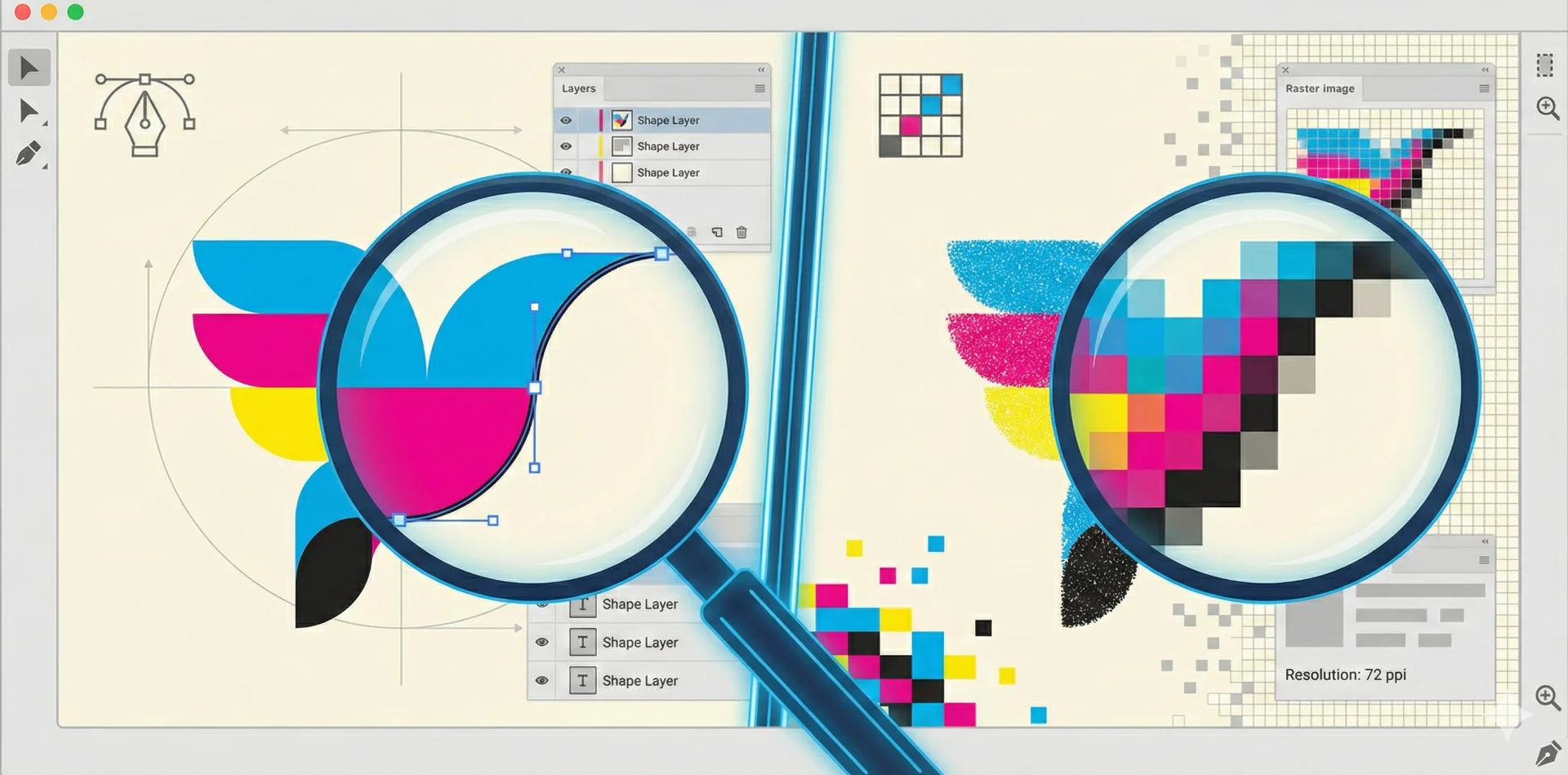
If you want your Brand Page to be a magical vending machine that dispenses every possible format a user could need, feed it a vector file.Why? Because vector files are math-based. When you upload a vector to SendTheLogo, our system can read the geometry and render it out at any size without losing a single pixel of crispness.
If you upload a raster file (like a JPG, PNG, or WebP), we can still host it and share it. But we can’t magically add resolution that isn’t there. If you start with a small pixel-based image and try to scale it up for a trade show booth, it’s not going to look pretty.
Pro Tip: Upload your master `.ai`, `.eps`, or `.pdf` file. We’ll keep that safe for the pros who need it, and automatically generate everything else for everyone else.The "Magic" Conversion Engine
Once you drop that file into the upload box, our custom-built automatic logo conversion processing engine kicks into gear. We don’t just store the file; we analyze it.
Here is what happens in the few seconds after you click "Upload":
- Intelligent Format Detection: We identify if the file is vector or raster to determine what outputs are physically possible.
- Thumbnail Generation: We create a visual preview so you (and your visitors) can actually see what the file is-no more guessing what filenames mean.
- Color Extraction: This is where it gets cool. Our algorithms analyze the file to identify the dominant brand colors using perceptual color clustering[cite: 13, 104]. [cite_start]We filter out near-white and near-black values to give you a usable palette immediately.
- Automatic Sizing: We instantly prepare the file to be served in every standard size your team might need.
Output: One Link, Infinite Solutions
This is the part that changes your life. When you share that single SendTheLogo link, your recipient doesn't just get a file; they get a portal.
Instead of emailing you back to ask for a specific version, they just toggle a switch on the page. They can self-serve downloads in whatever format or size they need-without requiring an account or login.
Our automatic logo conversion system automatically generates and offers:
* For the Web Developer: A clean, code-ready SVG.
* For the Social Media Manager: A pre-sized 1024px square image.
* For the Printer: A 3000px print-ready file (or a vector PDF) that looks sharp on everything.
* For the App Developer: A perfectly sized 32px, 48px, or 64px Favicon.
Stop Being the Bottleneck
The old way of managing logos-scattered folders, messy drives, and email attachments-turns you into a librarian. SendTheLogo turns you back into a strategist.
By letting our automatic logo conversion engine handle the technical boring stuff (resizing, converting, formatting), you ensure two things:
- Consistency: Everyone is using the correct, approved version of the logo, not a stretched JPEG they found on Google.
- Sanity: You stop being interrupted by low-value tasks.
So, go ahead. Upload once, share a link, and never resend a logo again. Your inbox will thank you.
* Ready to reclaim your time? Create your free brand portal at SendTheLogo.com today.